...
Add or edit an existing user. Expand Identity Providers at the bottom left of the screen. Select the Identity Provider previously configured, along with the IdP username NameID (must match the NameID Attribute returned in the SAML response).
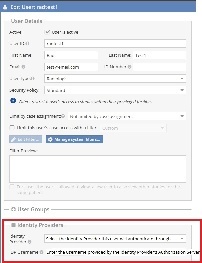 **The The IdP username NameID must match the value passed back from this username NameID attribute.
NOTE: Admins are responsible for creating Identity Providers (IdPs). They can either add users directly or delegate access by assigning privileges to facility managers, who can then add other facility managers, facility users, or assign existing users to IdPs for authentication.
NOTE: A user cannot change their password within OnePACS when configured to use SAML because that functionality is handled by the IdP. If you have trouble saving an IdP for a user, check to see if that user has the "Change password" permission and remove it, then try again.
NOTE:Most IdPs send back the NameID by default, but some may require it to be manually sent via IdP configuration.
Please reach out to our support team if you need assistance with setup.
...